Choose the right way to check your ticket
If you have a physical ticket and want help comparing its numbers with published draw results, Lottery Prize Check offers a photo-based comparison. Scanning happens in the iPhone app: this website explains the process and takes you to the App Store.
The app supports standard, full-share Saturday Lotto, Oz Lotto and Powerball single-draw entries, plus supported Set for Life ranges. The game name alone does not make every ticket format compatible. Read the game and format guide before checking a system, syndicate, mixed-product or advance ticket.
Photo comparison and official validation have different roles
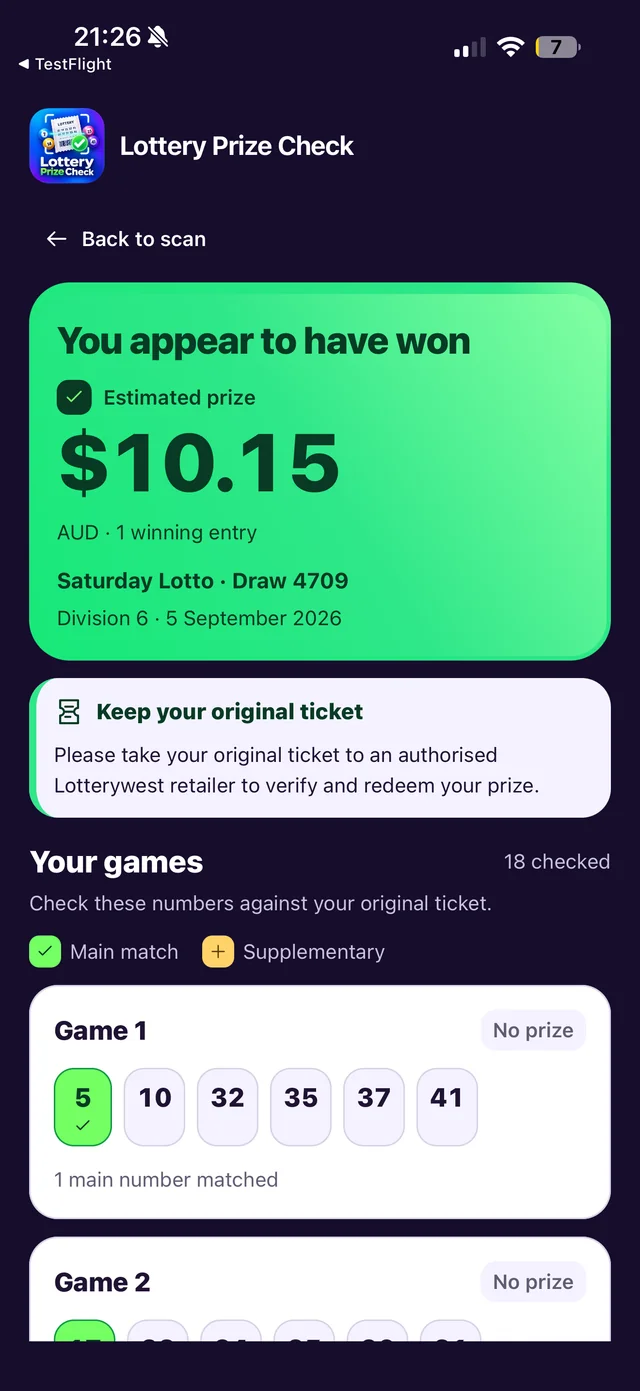
The app reads the printed ticket details and compares the recognised entries with published results for the relevant draw. You can inspect the numbers that matched and any potential winning divisions. It does not authenticate the ticket or decide whether a prize can be paid.
Lottery Prize Check is independent and is not affiliated with or endorsed by Lotterywest. For authoritative validation and redemption, keep your original physical ticket and take it to an authorised Lotterywest retailer. You can also consult Lotterywest's official results when reviewing draw information.
What to look for in the result
- Check that the recognised game, draw date and draw number match your ticket.
- Compare every displayed entry with the printed numbers, including the separate Powerball where applicable.
- Read the status of each draw. Future or unavailable results have not completed a check.
- Treat displayed amounts as estimates that require official verification.
A missing prize amount is not a zero-dollar prize, and a failed scan is not a losing result. If a photo cannot be read confidently, retake it or use official checking.
Keep the ticket, even after you scan
The app has no account or ticket history and does not replace the original ticket. See the photo-to-result steps for practical capture tips and common questions for help understanding the different outcomes.